简体中文 Tiếng Việt 日本語 한국어 हिन्दी Español Français العربية বাংলা Português Русский اردو Bahasa Indonesia Deutsch Naijá मराठी తెలుగు Türkçe தமிழ்
Hint: Press any key to start test - di key go light up live. Click "Diagnosis" if you want quick repair hints.
Keys tested 0
Total presses 0
Keys together (NKRO) 0
Max together 0
ESC
F1
F2
F3
F4
F5
F6
F7
F8
F9
F10
F11
F12
`
1
2
3
4
5
6
7
8
9
0
-
=
Bksp
Tab
Q
W
E
R
T
Y
U
I
O
P
[
]
\
Caps
A
S
D
F
G
H
J
K
L
;
'
Enter
Shift
Z
X
C
V
B
N
M
,
.
/
Shift
Ctrl
Win
Alt
Space
Alt
Win
Menu
Ctrl
PrtSc
ScrLk
Pause
Ins
Home
PgUp
Del
End
PgDn
Num
/
*
-
7
8
9
+
4
5
6
1
2
3
Ent
0
.
Key Name
-
Code
-
Which Value
-
Interval
- ms

Key Press Log

[00:00:00] Log started. Detect interval between two presses of di same key. Intervals <80ms na marked in red.
[00:00:00] Normal human operation na usually >100ms; <80ms may indicate chattering.
Total Logs: 2
Warnings: 0
Min Interval: - ms

Full keyboard check & diagnosis

Dis browser keyboard checker helps you find common keyboard wahala like fast repeat, chatter, double hit, slow response and NKRO limits. E also gives quick repair hints.

Key press interval

Measures di time between two presses of di same key. Automatically flags intervals below 80ms (red) as potential chattering, helping you diagnose debounce issues.

Chatter / double hit

Detect chattering caused by switch aging, contact oxidation, or dust. Counts press/release events and identifies sticky keys.

Response delay

Real‑time measurement of key response time. Analyzes delays from Bluetooth interference, USB power issues, or system load – accurate to milliseconds.

NKRO (full rollover)

Test your keyboard's NKRO capability – supports up to 36+ simultaneous keys. Real‑time display of concurrent key count.

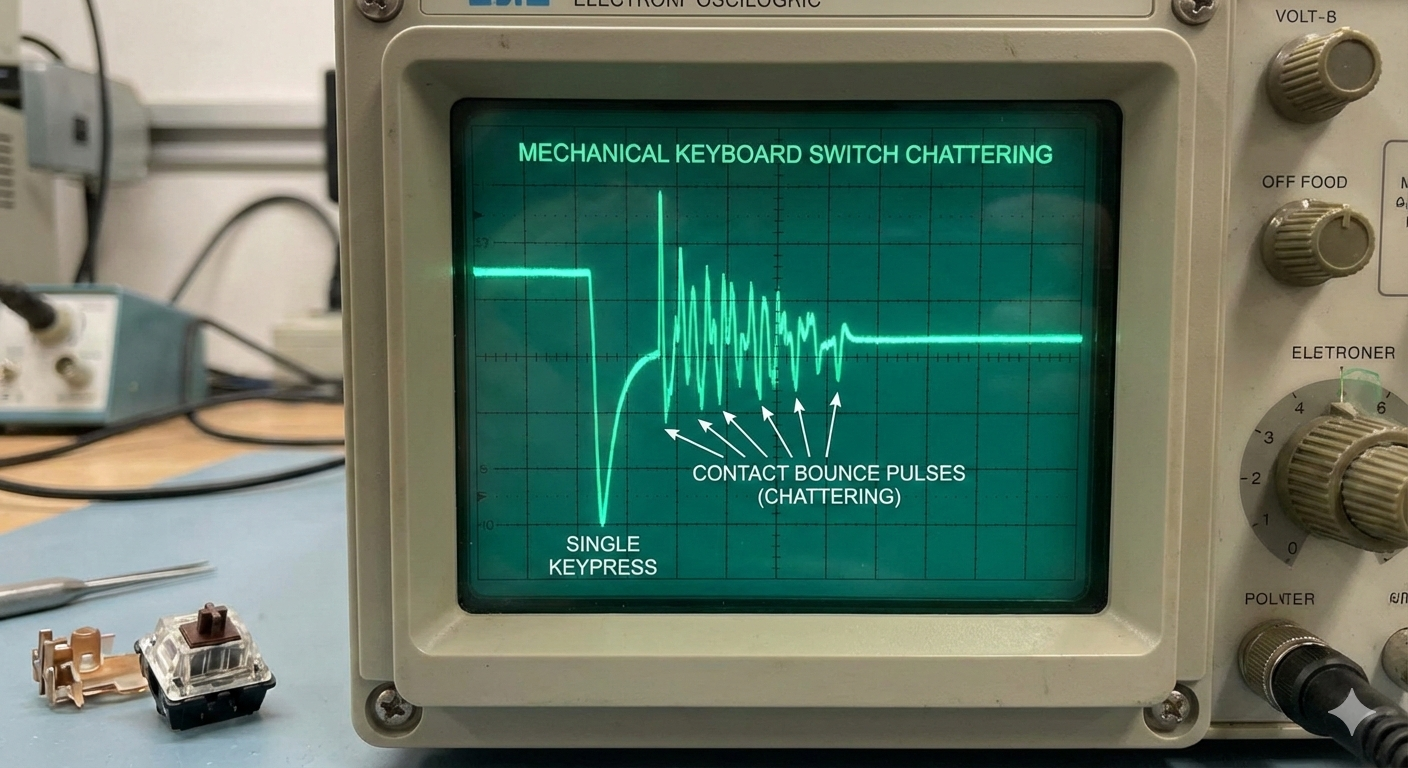
Diagram of mechanical switch contact bounce (chattering) – abnormal multiple pulses from a single press

Fig 1: Abnormal signal bounce caused by oxidized mechanical contacts (root cause of chattering)

Key Press Interval Detection: Diagnosing Chattering & Debounce Technology

Keywords:key press interval detection, chattering diagnosis, double‑click repair, keyboard debounce, key response time, mechanical switch bounce, key repeat rate test

What na key press interval detection and why na it important?

Key press interval detection na di core technology for diagnosing keyboard chattering and double‑click issues. By precisely measuring di time between two presses of di same key, you fit identify di following problems:

Interval Possible Cause Diagnosis Repair Suggestion
<20ms Contact bounce, circuit failure, severe chattering Severe fault – needs immediate repair Replace switch, check circuit, professional service
20-50ms Moderate chattering, debounce failure, dust Moderate fault – affects user experience Clean switch, update firmware, adjust debounce
50-80ms Mild chattering, early switch aging Mild fault – monitor Regular cleaning, avoid heavy typing, backup keyboard
80-200ms Normal fast typing, gaming Normal range – human operation No action needed
>200ms Normal typing speed, cautious operation Normal range – safe No action needed

Keyboard Debounce Technology Explained
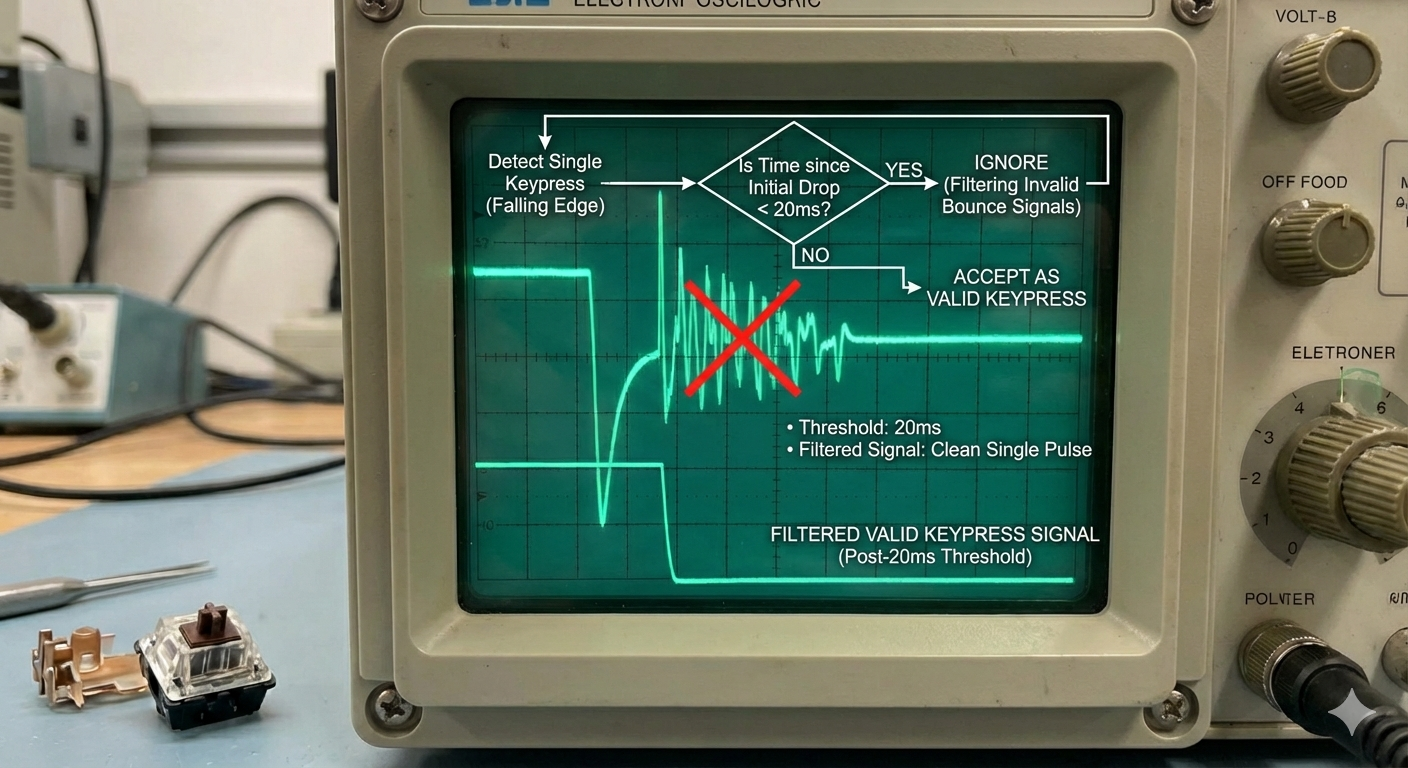
Diagram of keyboard debounce algorithm – filtering invalid bounce signals under 20ms

Fig 2: Firmware debounce algorithm filtering invalid contact bounces

Hardware Debounce

  • How it works:Uses RC circuits (resistor‑capacitor) to delay signal recognition and filter contact bounce
  • Response time:Typically 5‑20ms delay, ensuring stable detection
  • Advantages:Stable, no CPU usage
  • Disadvantages:Higher cost, limited response speed
  • Typical use:High‑end mechanical keyboards, gaming keyboards

How to test:Use dis tool. If intervals shorter than di debounce time (e.g., 20ms) na still registered, hardware debounce may be failing.

Software Debounce

  • How it works:Driver or firmware delays key event processing
  • Response time:Widely adjustable, typically 10‑30ms
  • Advantages:Flexible, lower cost
  • Disadvantages:Uses system resources, may affect response speed
  • Typical use:Most membrane keyboards, mid‑range mechanical keyboards

How to test:Vary your typing speed and observe interval consistency. Large fluctuations may indicate poor debounce settings.

Common Causes & Fixes for Chattering

Mechanical Keyboard Chattering

Causes:Spring fatigue, oxidized contacts, dust accumulation, cracked solder joints

Repair steps:

  1. Clean internal contacts with isopropyl alcohol
  2. Replace faulty switch (low cost)
  3. Re‑solder loose joints
  4. Adjust keyboard debounce settings

Prevention:Regular cleaning, avoid liquids, use keycap dust covers

Membrane Keyboard Chattering

Causes:Worn conductive traces, deformed silicone domes, oxidized PCB, overall aging

Repair steps:

  1. Clean conductive traces and PCB contacts
  2. Replace worn silicone domes (if spares available)
  3. Use conductive silver paint to repair broken traces
  4. If widespread, replace di keyboard

Prevention:Gentle use, keep clean, avoid high temperature/humidity

Software/Driver Issues

Causes:Driver conflicts, OS settings, firmware bugs, power management

Repair steps:

  1. Update keyboard drivers and firmware
  2. Check OS power management settings
  3. Reset keyboard to factory defaults
  4. Test on another computer to isolate system issues

Prevention:Regular driver updates, backup settings, use stable OS versions

Reference Key Press Intervals

Pro typist
100-150ms
Average user
150-300ms
Gamer (high APM)
80-120ms
Chattering threshold
<80ms
Contact bounce range
1-20ms

Best Practices for Key Press Interval Testing

  1. Test regularly:Use dis tool monthly, especially on frequently used keys (WASD, space, enter)
  2. Watch warnings:Red‑marked logs (interval <80ms) indicate potential issues – act early
  3. Establish baseline:Test a new keyboard to create a reference for future comparisons
  4. Track trends:Record interval changes over time to predict keyboard lifespan
  5. Repair promptly:Address chattering early to prevent further damage

Pro tip:For e‑sports players and heavy typists, perform a full key interval test every quarter to keep your keyboard in top shape.

How to use di keyboard checker

Dis tool's key press interval function helps you diagnose chattering and double‑click issues. Follow dese steps:

1

Start interval test

Quickly press di same key repeatedly (recommended: W, space, or enter). Watch di log panel – it records timestamps and calculates intervals automatically.

Key points:

  • Normal human interval na usually >100ms
  • Fast gamers may hit 80‑120ms
  • Intervalsbelow 80ms na marked red, indicating possible hardware issue
2

Read di log

The log shows detailed interval information:

  • White:normal (≥80ms)
  • Yellow:short (50‑79ms) – pay attention
  • Red:abnormal (<50ms) – likely fault
  • Dark red:severe (<20ms) – confirmed fault

Log format:[time] Key[key name] Interval:[time]ms [status]

3

Check di result

Use di log to assess keyboard health:

Observation Possible Issue Severity
Occasional red logs Mild chattering, early aging ★☆☆☆☆ Mild
Frequent red logs Moderate chattering – needs cleaning/repair ★★★☆☆ Moderate
Many <20ms intervals Severe chattering, debounce failure ★★★★★ Severe
Only specific keys Single switch/trace damaged ★★☆☆☆ Localized
All keys normal Keyboard na healthy ☆☆☆☆☆ Good
4

Wetin you fit do next

Based on results:

  1. Mild:Clean regularly, monitor changes
  2. Moderate:Deep clean, consider repair
  3. Severe:Repair immediately or replace keyboard
  4. Localized:Replace single switch (mechanical) or targeted fix

Repair advice:Mechanical keyboards na worth repairing (cheap switch replacement). For membrane keyboards with widespread issues, replacement na often more practical.

Keyboard checker FAQ

Why fit key press interval detect keyboard faults?

Key press interval detection na based on dese principles:

  1. Human limitation:The fastest intentional repetition of a single key by one finger na usually above 80ms.
  2. Mechanical constraint:Switches have physical rebound time – normal operation cannot bypass dis.
  3. Debounce design:Keyboards delay signal recognition (5‑30ms) to filter contact bounce.
  4. Fault signature:Chattering produces abnormally fast, repeated signals due to oxidized contacts, spring fatigue, etc.

Therefore, intervals <80ms strongly suggest hardware failure rather than human operation.

When fit sub‑80ms intervals be legitimate?

Rare cases where intervals below 80ms may be legitimate:

  • Alternating fingers:Using two fingers (e.g., index and middle) to rapidly press di same key fit achieve 60‑80ms intervals
  • Special skill:Pro typists or pianists may have exceptional finger speed
  • Automated testing:Using macros or test tools
  • Accidental bump:Unintentional key touches

How to tell:Legitimate fast presses na usually rhythmic and controlled, while chattering na random and uncontrollable. Frequent <50ms intervals almost certainly indicate a keyboard fault.

How does chattering differ between mechanical and membrane keyboards?

The failure mechanisms differ:

Mechanical chattering

  • Causes:Oxidized internal contacts, spring fatigue, dust
  • Characteristic:Usually affects a single switch, replaceable
  • Interval:Typically 10‑50ms, fairly consistent
  • Fix:Replace switch (low cost, ~$1‑2)

Membrane chattering

  • Causes:Worn conductive traces, deformed domes, PCB oxidation
  • Characteristic:Often affects a region, difficult to repair
  • Interval:Fluctuates widely, 20‑80ms possible
  • Fix:Thorough cleaning or replace keyboard

Diagnostic difference:Mechanical chattering tends to be more consistent; membrane chattering more random. Di log go show di pattern.

How to choose a repair based on interval measurements?

Select repair approach based on interval:

Interval range Severity Mechanical keyboard Membrane keyboard
70‑79ms Mild, early aging Clean switch, monitor Clean traces, avoid humidity
50‑69ms Moderate, needs attention Deep clean, consider switch replacement Pro cleaning, have spare keyboard ready
30‑49ms Severe, affects use Replace faulty switch immediately Consider replacement
<30ms Critical failure Check circuit, full repair Replace keyboard immediately

Cost consideration:Mechanical keyboards na worth repairing (cheap switch replacement). Membrane keyboards na often more economical to replace.

Start your keyboard check now

If your keyboard dey misbehave, no wait till e spoil work or game. Use dis tester check key interval and catch problem early.

Guide