How dis double-tap check page dey work
Dis article explains how mouse double-tap works and the main logic dis page uses to catch faulty extra-tap wahala quick-quick.
1. Wetin mouse dey send give di computer?
Mouse only sends three main kinds of information to di computer:
- Side condition:Whether side press or release happen.
- Motion shift:How far the mouse move for X and Y side.
- Wheel direction:Whether di wheel turn up or down.
Yes, na true: mouse no send any special double-tap mark to the computer. E only sends quick side-press and release timing. So the mouse itself no sabi wetin double-tap be. Na the system dey decide whether the timing should count as double-tap.
2. Wetin double-tap mean well?
A double-tap happens when any mouse side is pressed two times inside one time window, usually around 500ms. That limit fit change across different system setups. Once the timing matches the rule, the system reads am as double-tap. In short, na the system, no be the mouse itself, set that double-tap rule.
Quick note:
As long as the gap between two presses stays below 500ms, the system fit count am as double-tap. Even 50ms or 20ms still enters the rule. Person hand normally no fit do that on purpose, but the system no check whether person truly mean am. Na this same rule make some mice show faulty extra tap wahala.Quick note:
Left-side double-tap na the normal default action for big computer systems like Windows and macOS. But some special work apps, like design apps, 3D work apps, or mapping software, fit assign right-side double-tap to cancel the current command or jump back to the menu wey show before.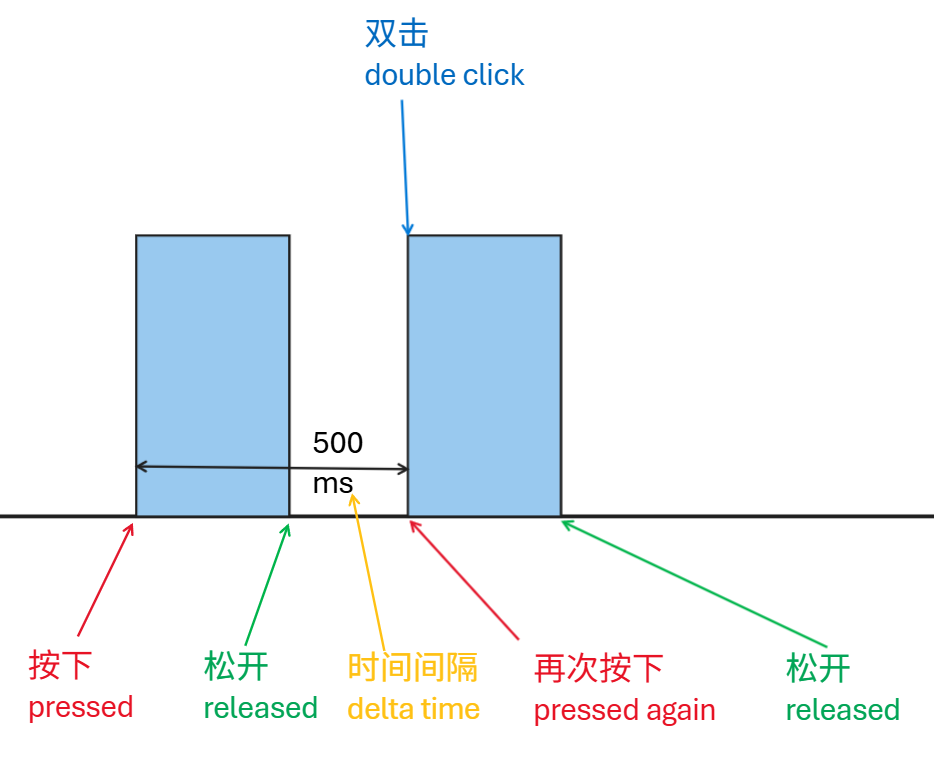
3. Wetin be faulty extra tap?
A faulty extra tap happens when person taps only once, but because of mouse hardware wahala the system receives more than one tap mark, often below 80ms apart. Human tap speed normally no reach that level, but the timing still matches the system double-tap timing rule well.
Faulty extra tap often shows like this:
- One tap fit open file and close am back sharp sharp.
- When you dey drag something, the hold fit break halfway.
- One tap inside text fit mark two words once.
Quick note:
Faulty extra tap fit also be called abnormal double tap, chattering, or bounce-tap wahala proper.4. How faulty extra tap dey happen?
The main reason faulty extra taps dey happen na contact wey dey open and close abnormally inside the switch. Common causes be these:
- Switch aging:Metal spring don tire after long use, so rebound no clean.
- Contact oxidation:Air and moisture affect the surface and raise contact resistance.
- Dust or dirt:E enters the switch and makes contact unstable.
- Mechanical wear:Contact surface don wear and no dey touch well again.
Those physical changes fit make the circuit open and close many times during one single press, and the system then mistakes am for many extra taps.
5. How dis page take spot faulty extra tap
Dis page uses precise timing and page event listeners to spot tap marks wey no look like normal human tap pattern at all.
How detection take work:
- Event listening:Live capture of mouse
mousedownandmouseupevents. - Time record:Sharp time record for every event mark.
- Gap check:Calculation of the gap between two nearby
mousedownevents.
How e take judge am:
If the interval between two mousedown events is less than 80ms, the page marks am as faulty extra tap. That na because normal human double tap often stays above 100ms, so anything shorter than 80ms usually points to switch-bounce trouble.
if (timeBetweenPresses < 80ms) → page marks am as faulty extra tap
[10:00:01] Left side down
[10:00:01] Left side up (Interval: 45ms) →CHATTERING DON SHOW
The page also keeps record of how many faulty extra taps don show.
6. Wetin mouse makers fit do to reduce faulty extra tap?
Some better mouse brands and models give debounce option, so person fit tune am from the control-app side and reduce how often faulty extra tap go happen. The diagram below shows how the mouse signal flow look once debounce control joins the matter.
Mouse brands and models wey fit adjust debounce well
| Brand | Series/model sample | Control app side | Usual debounce range | Extra note |
|---|---|---|---|---|
| Rapoo | VT series (VT1 Pro Max, VT3s Max, VT3 Pro Max, VT1 Air Max, VT9, etc.) | A-Hub | Usually supported, adjustable 0~20ms | |
| VGN | Dragonfly series (Dragonfly F1 Pro Max, etc.) | VGN VHUB | E support custom debouncing | |
| Keychron | Some gaming mice | Keychron Launcher | Draggable adjustment | |
| Razer | Some high-end models (e.g., certain Viper/DeathAdder models after firmware update) | Razer Synapse | Some models support am (no be all) | |
| Logitech | G Pro series (some models) | G HUB | Partial support (from 4ms) | |
| MACHENIKE | L8Max model | L8 control-app side | E support (2ms, 4ms, 8ms) |