How mouse dey work and wetin dey inside am

Deep look into mouse inner parts, different mouse technologies, and how our checker takes notice common mouse wahala fast.

Basic way mouse take work

As one of di main computer input devices, mouse work na to turn hand movement into digital signal wey computer fit understand. No matter the mouse type, the basic work flow still follows these key steps:

Mouse work flow step by step

1
Physical action
(Hand move/Click)
2
Sensor detection
(Light/Mechanical)
3
Signal conversion
(Analog→Digital)
4
Data transfer
(USB/Wireless)
5
System processing
(Control app)
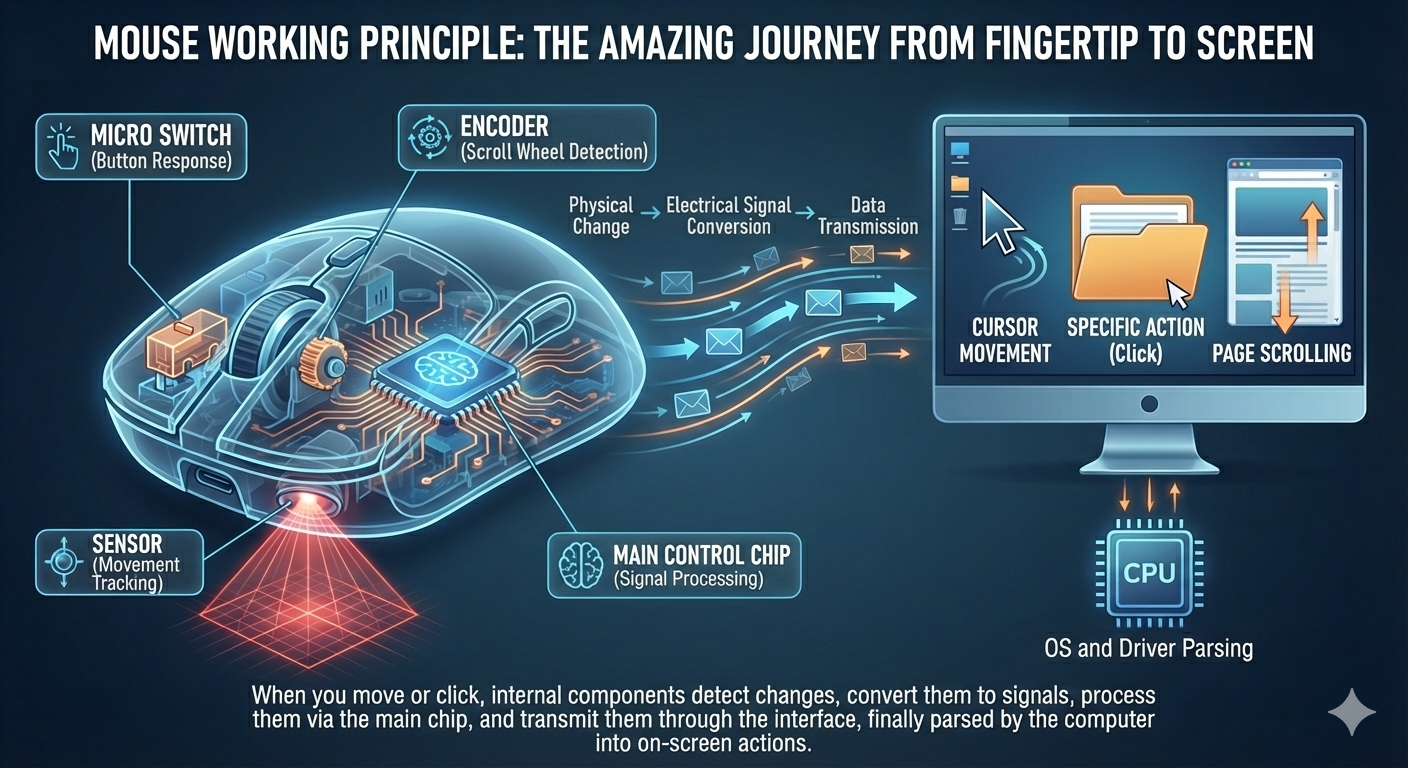
Diagram wey show how mouse signal move from physical input reach system processing
Mouse work sketch - from physical touch reach system response
Main parts:Micro-switches (button response), sensor (movement tracking), encoder (scroll-wheel detection), and main control chip (signal handling).

When you move di mouse or press button, internal parts notice that physical action, convert am into electrical signal, send am through USB or wireless link, then operating system and control app read am as cursor movement or another action on screen.

Mouse types and tech difference dem

Mouse tech don pass through many stages, from old ball mouse to di light-sensor and laser-track styles wey many people use today:

Ball mouse

How e works:E uses rubber ball to turn two crossing rollers, then encoder disks detect movement.

Main traits:Needs mouse pad, dust dey gather easily, and precision low compared with modern types.

Popular time: 1980s-1990s

Light-sensor mouse

How e works:E uses LED light and CMOS sensor to compare surface image change and calculate movement.

Main traits:No special mouse pad needed, precision better, and na wetin plenty people dey choose.

DPI level:800-3200 DPI

Laser-track mouse

How e works:E uses laser diode instead of LED, so surface compatibility and precision go higher.

Main traits:Works for almost any surface, very high precision, often for serious work and gaming setups.

DPI level:Up to 16000+ DPI

Ball, light-sensor, and laser-track mouse tech comparison table
Tech type Precision Surface fit Power use Normal use
Ball mouse Low (200-400 DPI) Needs special pad Medium Old computer use
Light-sensor mouse Medium-High (800-3200 DPI) Most non-reflective surfaces Low Daily office and home work
Laser-track mouse Extremely High (Up to 16000+ DPI) Almost any surface Medium Gaming and sharp design work

How buttons and scroll wheel take work

Mouse buttons and scroll wheel na di parts wey people touch pass, and how dem work directly affects how smooth or annoying di mouse feels:

Micro-switches:Na dem be di core part of mouse buttons. When button press, internal spring contacts make electrical signal; when you release am, di spring reset back. Micro-switch life often dey between 5 million and 20 million clicks.
Scroll-wheel encoder:Optical or mechanical encoder inside di wheel converts turning movement into pulse signals. Mechanical versions use metal contact, while optical versions use light pattern and sensor for longer life.

Common failure patterns:

  • Faulty double-click:Micro-switch spring don oxidize or bend, so contact no clean and false clicks enter
  • Button failure:Micro-switch fully spoil or solder joint come loose
  • Reverse or wrong scroll:Encoder wear make wheel lose correct position
  • Side-button failure:Side-button switch spoil or cable connection get issue

How dis mouse checker take detect wahala

Dis checker uses JavaScript event listeners to watch mouse activity and judge whether something dey wrong:

How button detection work

Di tool listens to page mousedown and mouseup events. Every mouse button gets its own value: Left (0), Middle (1), Right (2), Side B4 (3), Side B5 (4). Once event fire, the matching counter goes up.

How double-click detection work

Di tool records timestamp for every click and calculates time gap between clicks. Normal double click usually dey around 200-500ms, while faulty double click often too fast, below 80ms. From that gap, di UI fit show normal or faulty feedback with different colors.

How scroll-wheel detection work

By listening to wheel events, di page reads deltaY to know scroll direction. Positive value means down, negative value means up. Di test area blocks normal page scrolling so your wheel action fit enter di checker properly.

How fault status dey judged

Di tool checks whether: 1) press and release count no match; 2) one button no answer at all; 3) faulty double clicks dey happen too often; 4) wheel only answers one direction. Most times, those signs point to hardware wahala.

Technical limit:Because browser-page security get limits, dis tool no fit read advanced values like true DPI or real USB polling rate, and e no fit test macro functions wey need control tools. Still, e fits catch plenty common mechanical wahala well.

Go back to di mouse checker page