Mouse Working Principle & Technical Analysis

Deep dive into mouse internal mechanisms, different mouse technologies, and how our testing tool detects issues

Basic Mouse Working Principle

As one of the most important computer input devices, the mouse's core function is to convert hand movements into digital signals that computers can understand. Regardless of mouse type, the basic working principle involves these key steps:

Mouse Working Process Flowchart

1
Physical Movement
(Hand movement/Clicking)
2
Sensor Detection
(Optical/Mechanical)
3
Signal Conversion
(Analog→Digital)
4
Data Transmission
(USB/Wireless)
5
System Processing
(Driver software)
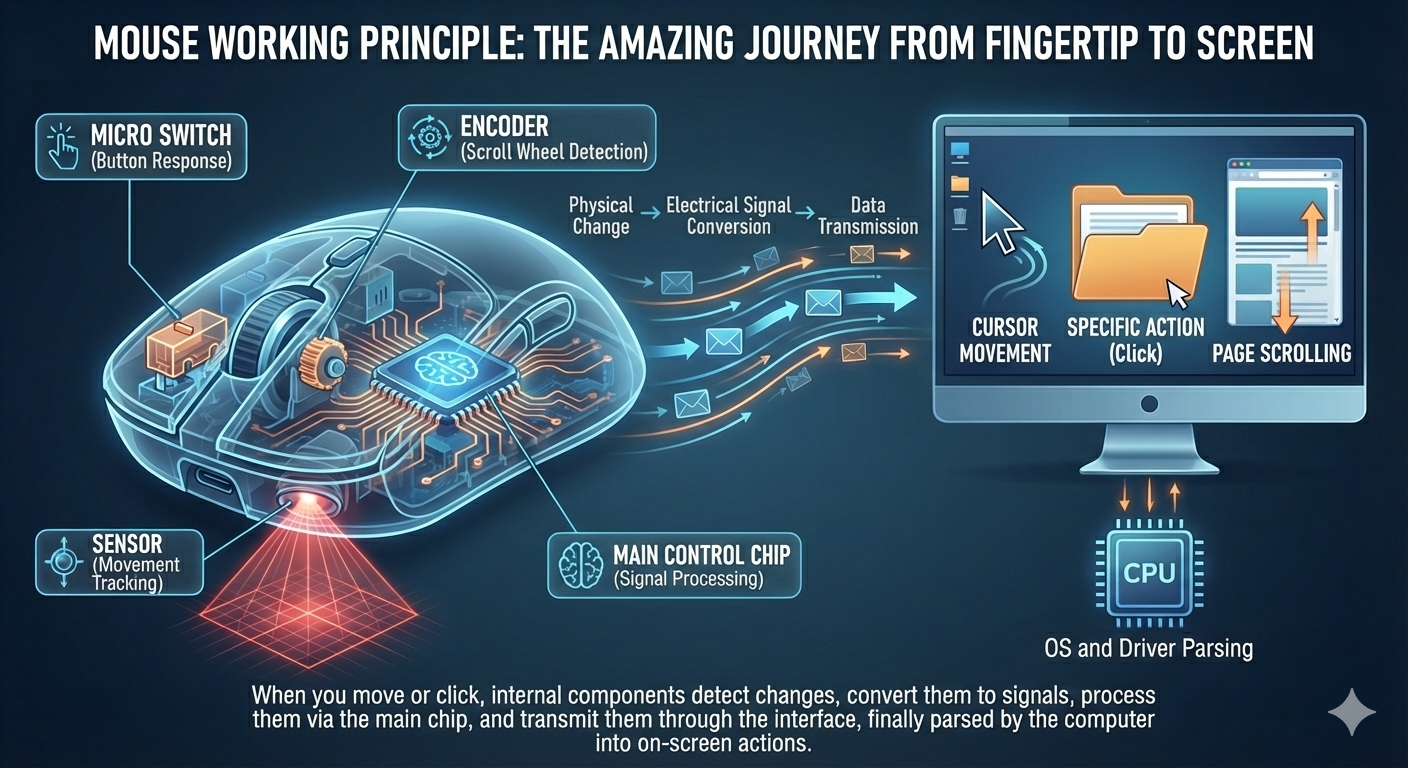
Mouse working principle diagram showing complete process from physical input to system processing
Mouse Working Principle Diagram - Shows complete process from physical input to system processing
Key Components: Micro switches (for button response), Sensor (tracks movement), Encoder (scroll wheel detection), Main control chip (signal processing).

When you move the mouse or press buttons, internal sensors detect these physical changes, convert them into electrical signals, transmit them through the interface to your computer, and finally the operating system and drivers interpret them as cursor movement or specific actions on screen.

Mouse Types & Technology Differences

Mouse technology has evolved through several revolutions, from original mechanical mice to today's optical and laser mice:

Mechanical Mouse

Working Principle: Uses rubber ball to drive two perpendicular rollers, with encoding disks at roller ends detecting movement.

Characteristics: Requires mouse pad, collects dust easily, lower precision.

Popular Era: 1980s-1990s

Optical Mouse

Working Principle: Uses LED light source and CMOS sensor to calculate movement by capturing surface image changes.

Characteristics: No mouse pad needed, higher precision, mainstream consumer products.

DPI Range: 800-3200 DPI

Laser Mouse

Working Principle: Uses laser diode instead of LED, providing higher surface compatibility and precision.

Characteristics: Works on almost any surface, ultra-high precision, professional-grade products.

DPI Range: Up to 16000+ DPI

Optical, laser and mechanical mouse technical parameter comparison table
Technology Type Precision Surface Compatibility Power Consumption Common Applications
Mechanical Mouse Low (200-400 DPI) Requires special pad Medium Early computers
Optical Mouse Medium-High (800-3200 DPI) Most non-reflective surfaces Low Daily office, home use
Laser Mouse Extremely High (Up to 16000+ DPI) Almost any surface Medium Gaming, professional design

Button & Scroll Wheel Working Mechanisms

Mouse buttons and scroll wheels are the most frequently operated components, and their working principles directly affect user experience:

Micro Switches: The core component of mouse buttons. When a button is pressed, internal spring contacts create electrical signals; when released, the spring resets. Micro switch lifespan typically ranges from 5 million to 20 million clicks.
Scroll Wheel Encoder: The optical or mechanical encoder inside the scroll wheel converts rotational motion into pulse signals. Mechanical encoders use metal contacts, while optical encoders use gratings and photoelectric sensors for longer lifespan.

Common Failure Mechanisms:

  • Double-click Failure: Micro switch spring oxidation or deformation causes poor contact and false triggering
  • Button Failure: Complete micro switch damage or solder joint detachment
  • Scroll Wheel Reverse Scroll: Encoder wear causes inaccurate positioning
  • Side Button Failure: Side button micro switch damage or ribbon cable connection issues

Mouse Testing Tool Detection Principle

This online testing tool uses web technology to detect mouse status through JavaScript event listeners:

Button Detection Principle

The tool listens to browser mousedown and mouseup events, with each mouse button having corresponding button values: Left(0), Middle(1), Right(2), Side B4(3), Side B5(4). When events trigger, corresponding counters increase.

Double-click Detection Algorithm

The tool records timestamps for each click, calculates time intervals between consecutive clicks: Normal double-click(200-500ms), Faulty double-click(<80ms). Determines double-click nature by time difference and provides feedback with different colors in UI.

Scroll Wheel Detection Mechanism

By listening to wheel events, obtains deltaY value to determine scroll direction. Positive values indicate downward scrolling, negative values indicate upward scrolling. The tool prevents default scrolling behavior in the test area.

Fault Status Judgment

Determines mouse status based on: 1) Press/release count mismatch; 2) Complete button unresponsiveness; 3) Frequent faulty double-clicks; 4) Scroll wheel unidirectional unresponsiveness. These abnormalities typically correspond to hardware faults.

Technical Limitations: Due to browser security restrictions, this tool cannot detect advanced parameters like DPI, polling rate, nor test macro functions requiring drivers. However, it can effectively detect basic mechanical faults.

Return to Mouse Test Tool